
How to Download TikTok Videos Without Watermark on Mobile and PC 2026
Introduction
Learn how to download TikTok videos without logo on mobile and PC with the latest 2026 method. Many people love TikTok videos, especially tutorials, new technology videos, and AI tips. While many users want to save these videos for personal use, their experience is often hindered by brand logos and watermarks blocking the view. To solve this, taitiktok.net has launched a powerful tool to download TikTok videos without any logos or watermarks. Now, downloading TikTok content is simpler than ever with taitiktok.net. We guarantee 100% success on all smartphones and computers. You can apply the following instructions to your device immediately.
General Instructions for All Devices
Step 1: Copy the Video Link

Open the TikTok app, find the video you want to download, and follow these steps:
- Press and hold your finger in the middle of the video to show the sharing options – “Share with”. On a computer, right-click on the video.
- Click the chain icon; you will see the screen display “Link copied”.
- Share and select Copy Link.
Step 2: Paste the link into taitiktok.net
Visit our website, click the Paste link button and press DOWNLOAD NOW.
Step 3: Save the video to your device
BELOW ARE SPECIFIC INSTRUCTIONS FOR EACH TYPE OF DEVICE:
How to Download TikTok Videos Without Logo on Android and PC/Laptop
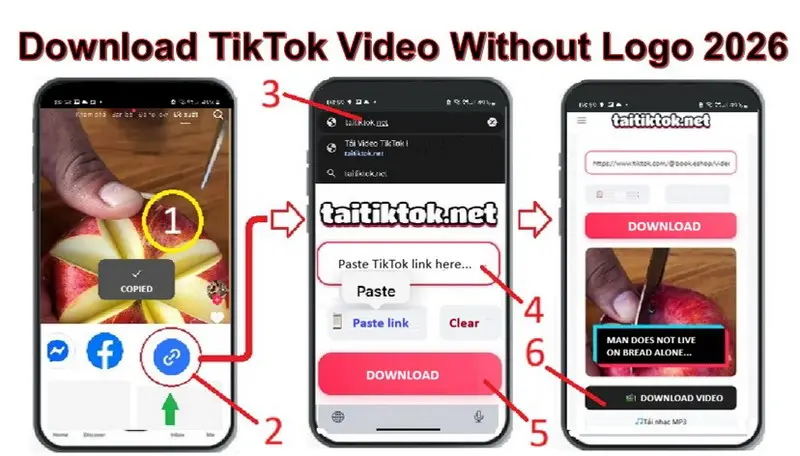
First, you need to open the TikTok app or visit their official website to choose the video, then follow these steps:
- Press and hold in the middle of the video to show “Share with” – On PC, right-click the video.
- Click the link icon to see “Link copied” – On PC, click Copy link.
- Open the browser on Android, type “taitiktok.net” in the search box and press “Go” – On PC, open a new tab and type taitiktok.net then press Enter.
- Once the page appears, click the “Paste TikTok link…” box and press “Paste link” – Same for PC.
- Press “Download Now” to see the video thumbnail and the “Download Video” button.
- Click “Download Video” and wait for the process to finish.
Note: To enjoy your downloaded TikTok video, simply go to the “File” folder (or Files), select “Download,” and click the new video. You will enjoy a clean video without distracting logos, ads, or popups.
How to Download TikTok Videos Without Logo on iPhone, iPad (iOS)

⚠️ Important Note: Apple has high security, so you MUST use the Safari browser (iPhone’s default) to download.
AFTER PRESS DOWNLOAD NOW (PINK BUTTON) YOU CAN CONTINOUS
Press the OPEN TO DOWNLOAD button (green).
When the video appears, look at the Safari toolbar at the bottom and click the Share (↑) icon.
Swipe up and select Save to Files.
Your video will be saved in the Files app of your iPhone.
Frequently Asked Questions (FAQ)
Q1: Why can’t I download TikTok videos on Chrome (iPhone)?
Answer: Due to Apple’s security policy, Chrome on iPhone does not support direct file downloads. Please switch to the Safari browser.
Q2: Where are downloaded videos stored on iPhone?
Answer: After selecting “Save to Files,” the video will be in the Files app. You can view it there or move it to your Photos library.
Q3: Is there a fee to download videos on taitiktok.net?
Answer: It is completely free and there is no limit on the number of videos you can download.
Visit TaiTikTok now to start downloading TikTok videos without logo for free!